

VS Code Extension
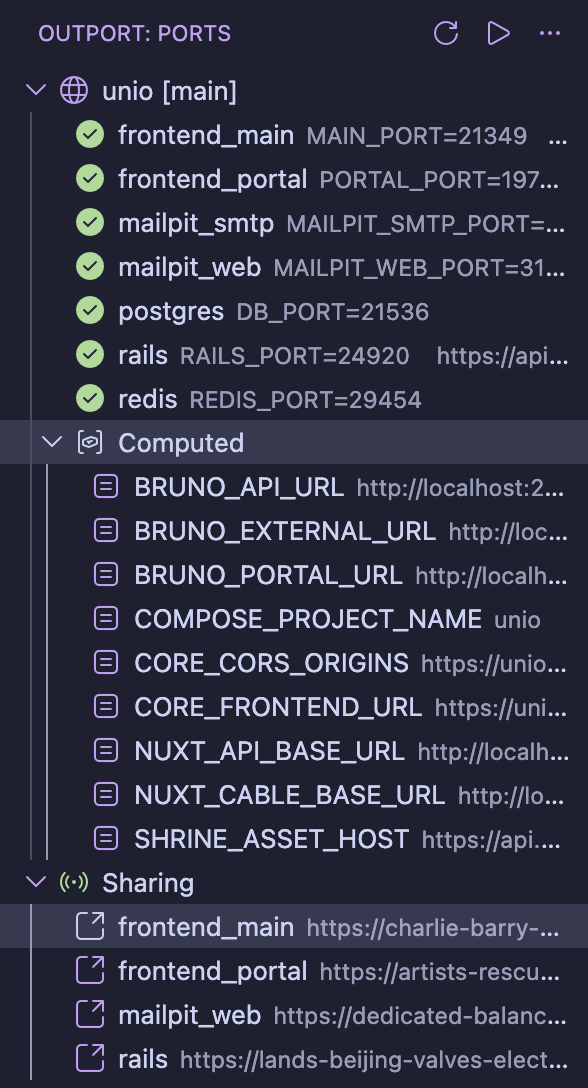
The Outport for VS Code extension puts your ports, URLs, and service health right in the editor.
Install
Search for "Outport" in the VS Code Extensions panel, or:
code --install-extension steveclarke.outportRequires the Outport CLI. If it's not on your $PATH, set outport.binaryPath in Settings.
Features
Sidebar Panel
The Outport sidebar shows all services for your current project with:
- Ports and URLs for each service
- Health indicators — green when a service is listening, red when it's not
- Instance label — shows
[main],[bxcf], etc. - Computed values — collapsible section showing resolved template values
- Action buttons — Run Up, Run Up --force, Run Down, Refresh
The sidebar auto-refreshes when you run outport up or outport down from the terminal, or when external changes are detected via the registry file watcher.
Clickable URLs
Click any HTTP service in the sidebar to open it in your browser. Right-click for more options:
- Copy Port — copies the port number
- Copy URL — copies the full URL (e.g.,
https://myapp.test) - Copy Env Var — copies the assignment (e.g.,
PORT=13842)
Status Bar
A status bar item shows your project name and instance at a glance. Click it to focus the sidebar panel.
Config Authoring
When editing outport.yml, you get:
- Autocomplete for service fields (
env_var,hostname,preferred_port,env_file) - Validation for required fields and value formats
- Hover documentation for config options
Requires the Red Hat YAML extension.
Commands
All commands are available from the Command Palette (Cmd+Shift+P):
| Command | Description |
|---|---|
| Outport: Run Up | Allocate ports and write .env files |
| Outport: Run Up --force | Re-allocate all ports from scratch |
| Outport: Run Down | Remove project from registry and clean .env files |
| Outport: Refresh | Refresh the sidebar panel |
Settings
| Setting | Default | Description |
|---|---|---|
outport.binaryPath | outport | Path to the Outport binary if not on your $PATH |
Multi-Root Workspaces
In multi-root VS Code workspaces, Outport detects outport.yml in each workspace folder independently. Each folder shows its own project in the sidebar.